
Help Center

Getting Started
Trading
My Account
Mutual Funds
IPOs
Stock SIP
Gold
NPS
Government Securities
Fixed Deposits
Insurance
Loan
Smallcase
DartStock
Upstox API
NCD
US Stocks
How do I see my stock investments in Upstox Investors mode?
Follow these steps to view your investments and orders on the Upstox Investor mode:
Steps to Access 'Your Investments'
Step 1: Log in to the Upstox app using your 6-digit PIN or biometrics and switch to ‘Investors’ mode.
Step 2: Tap on the 'Stocks' tab and navigate to ‘Your Investments.’
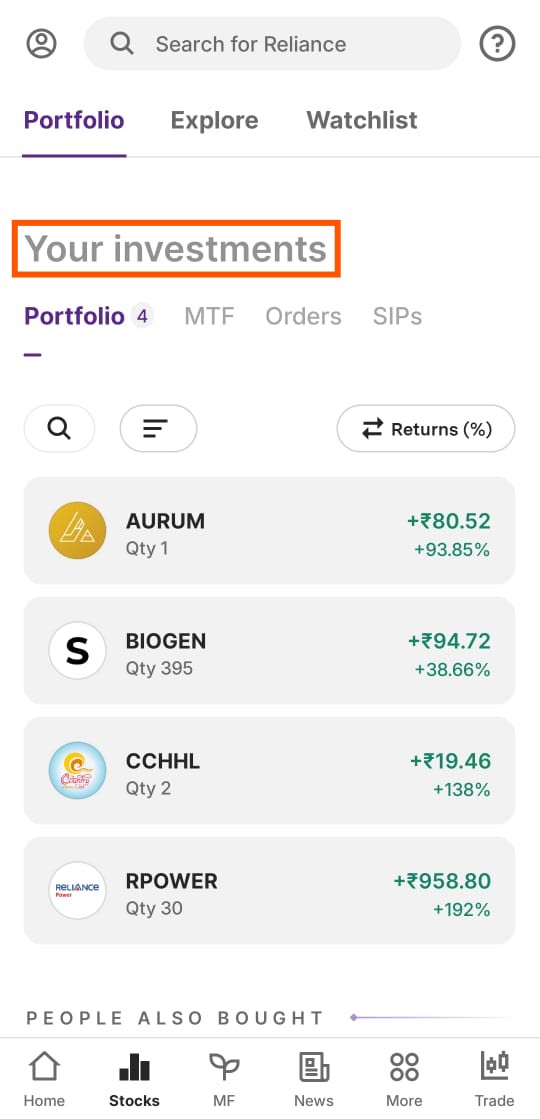
What Does the 'Your Investments' Section Include?
This section consists of three tabs:
Portfolio Tab
- Displays a list of stocks in which you currently have investments.
- Users can sort the list by changing the display value via the dropdown menu on the screen. The list is sorted from high to low based on the selected value.
Open Orders Tab
- Shows the latest orders that are still open.
- Includes a ‘View All’ button, which redirects users to the Order List page.
- The Order List page displays a comprehensive list of all orders, including those that have been processed today.
SIP Tab
- Here you can see all your SIP orders which are canceled, open, or completed.
This feature allows users to efficiently track their investments and manage their orders with ease.
Trade with Upstox
Want to open a Demat account?
Open a FREE Demat and Trading account to invest in Stocks, Mutual Funds, IPOs and more.
+91
By signing up you agree to receive transaction updates on Whatsapp. You may also receive a call from an Upstox representative to help you with the account opening process.
Upstox Community
Upstox Community
| Topic | Replies | Views | Activity |
|---|