
Help Center

Getting Started
Trading
My Account
Mutual Funds
IPOs
Stock SIP
Gold
NPS
Government Securities
Fixed Deposits
Insurance
Loan
Smallcase
DartStock
Upstox API
NCD
US Stocks
How to apply for Buy-back?(via Mobile application)
You can apply for Buy-back by following these steps:
Step 1: Login to the Upstox app using your 6-digit Pin or biometrics.
Step 2: Click on the Upstox icon at the top-left corner of the app screen.'
Step 3: Select ‘My account’ and then select ‘ Actions.’
Step 4: Select 'Corporate Actions.'
Step 5: Click on the required title/Stock Buyback.
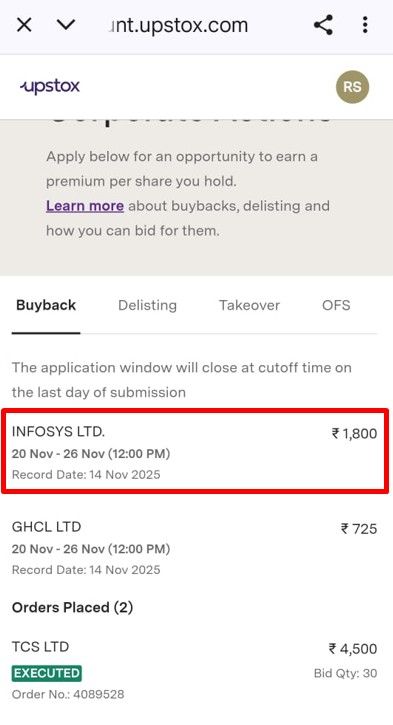
Step 6: Enter the quantity and click on 'Apply.'
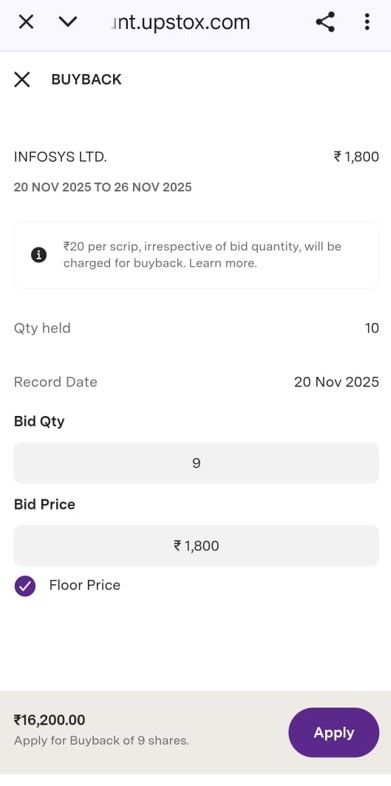
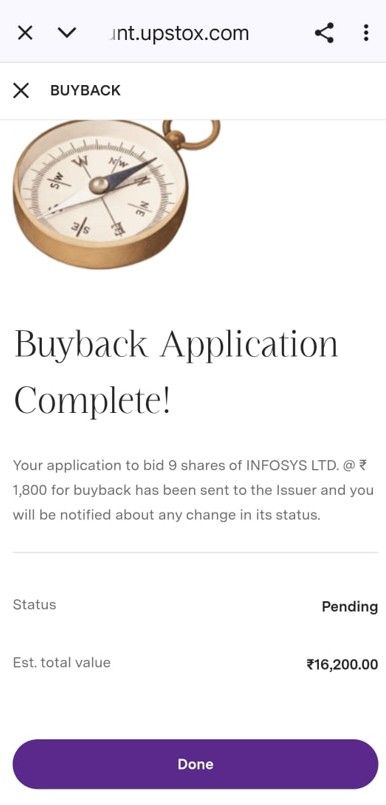
Step 7: If DDPI is updated, then buyback will be completed.
OR
Step 8: If applying via CDSL pin, click on 'Continue to CDSL' if TPIN is available.
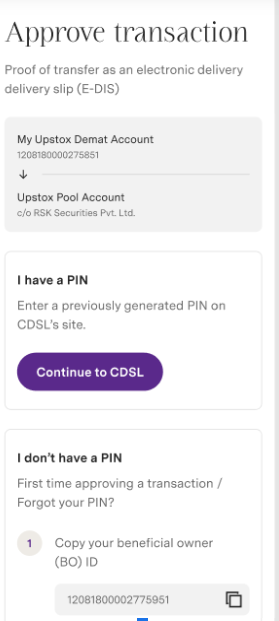
Step 9: If TPIN is not available, scroll down and select ‘Generate PIN on CDSL.'
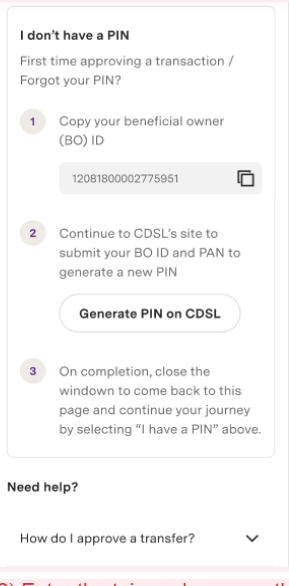
Step 10: Enter the TPIN and approve the transaction. The next important step is to click on the "Close this Tab" button.
Step 11: Click on 'Done.'
Step 12: You can check the order status under the ‘Orders placed ‘ tab.
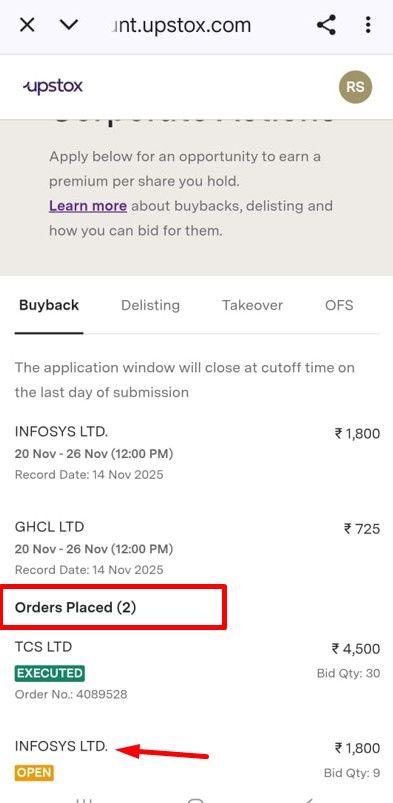
Important Notes:
- Buy-back orders are collected until 12:00 PM on the offer end date. Make sure that you hold enough quantity in your Demat account before the closure of the offer end date.
- Charges for the orders placed online are flat ₹20 + GST. These charges are non-refundable irrespective of orders accepted/rejected/failed.
- Statutory charges are applicable during a Buyback transaction.
- All the funds for your accepted shares will be directly credited to your bank account and in case of excess shares, they will be credited back to your Demat account by the registrar and transfer agents (RTA).
- Ensure that you apply your shares during the offer window. Offers cannot be made after the window closes. The acceptance ratio will be calculated only when the offer window closes and it will be based on the number of shares applied along with the number of retail investors participating in the buy-back.
- If you apply for more shares than your entitlement, then whether these additional shares will be accepted for buy-back or not will solely depend on the acceptance ratio decided by the company.
- If your shares are pledged, you will have to unpledge the share before applying for Buyback.
Trade with Upstox
Want to open a Demat account?
Open a FREE Demat and Trading account to invest in Stocks, Mutual Funds, IPOs and more.
By signing up you agree to receive transaction updates on Whatsapp. You may also receive a call from an Upstox representative to help you with the account opening process.
Upstox Community
Upstox Community
| Topic | Replies | Views | Activity |
|---|