
Help Center

Getting Started
Trading
My Account
Mutual Funds
IPOs
Stock SIP
Gold
NPS
Government Securities
Fixed Deposits
Insurance
Loan
Smallcase
DartStock
Upstox API
NCD
US Stocks
How can I switch between different templates in Scalper?
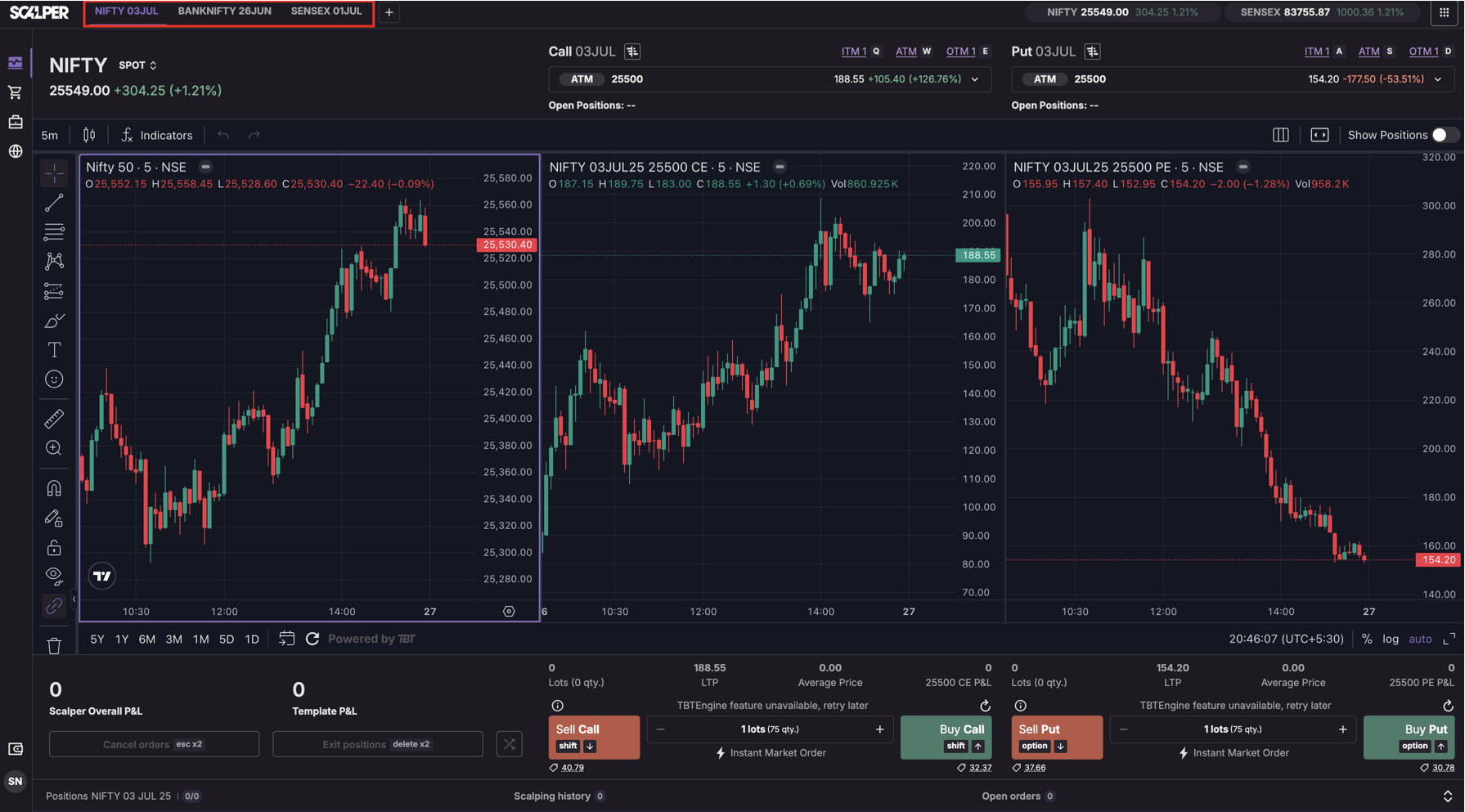
To switch between templates in the Scalper Terminal:
- Locate the template tabs at the top of the terminal screen.
- Click on any template tab to activate it.
When you switch, the terminal will:
- Automatically load the associated charts (Index, Call, Put).
- Restore any saved chart layouts, drawings, and indicators.
- Load the execution panel and strike information specific to that template.
Templates are auto-synced per user, so switching restores exactly what you last saw or configured.
Note: You can manage up to 10 templates, scroll horizontally to access templates beyond the first 6.
Trade with Upstox
Want to open a Demat account?
Open a FREE Demat and Trading account to invest in Stocks, Mutual Funds, IPOs and more.
+91
By signing up you agree to receive transaction updates on Whatsapp. You may also receive a call from an Upstox representative to help you with the account opening process.
Upstox Community
Upstox Community
| Topic | Replies | Views | Activity |
|---|