
Help Center

Getting Started
Trading
My Account
Mutual Funds
IPOs
Stock SIP
Gold
NPS
Government Securities
Fixed Deposits
Insurance
Loan
Smallcase
DartStock
Upstox API
NCD
US Stocks
Minor Account
How to buy a MTF position?
There are two methods through which you can buy an MTF position in Upstox:
Method 1
Step 1: Log in to your Upstox app. Make sure you’re in the ‘Upstox for Traders’ section.
Step 2: Click on ‘My Lists’ at the bottom of the screen and a list of companies will appear in front of you.
.jpg)
Step 3: Select the company you want to execute an MTF trade on. For the sake of example, let’s take TCS Ltd.
.jpg)
Step 4: Once you click on TCS Ltd, you will see all the quantitative data of its shares. Click on the green ‘Buy’ button.
Step 5: Under ‘Regular’, fill in the order details and tick the box beside ‘Buy using MTF for ₹XX/share’.
.jpg)
Step 6: Swipe from left to right on ‘Swipe to Buy’, and your MTF order will be placed, simultaneously activating MTF on your Upstox app.
Method 2
Step 1: Log in to your Upstox app. On your homepage, at the bottom right corner, you will see a ‘Trade’ option.
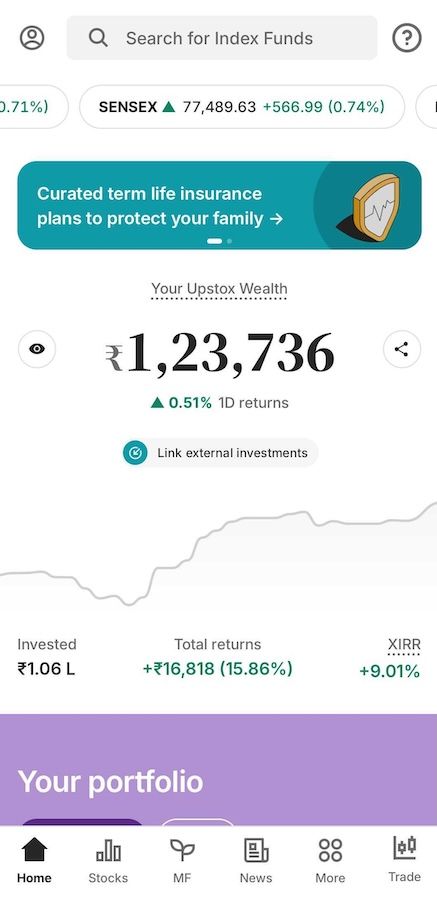
Step 2: Click on the “Trade” option. Upstox Trade will open up. On the homepage, you will see multiple options like F&O, Stocks and Mutual Fund, etc. Click on “MTF”.
.jpg)
Step 3: You can search for MTF stocks by typing out the name of the company you want to activate the MTF script for and clicking Enter. For the sake of example, we’ll be using TCS Ltd for activating MTF in Upstox.
.jpg)
Step 4: Click on the company’s name, TCS Ltd. You will see TCS CPM (current market price) and the payment needed to activate TCS’s MTF in purple.
Step 5: Click on the TCS Ltd name and a pop-up will appear where you will be asked to fill in order details according to your preference.
.jpg)
Step 6: At the bottom, swipe on the green ‘Swipe To Buy (MTF)’ button from left to right.
Terms & Conditions Apply:
RIGHTS & OBLIGATIONS OF STOCK BROKERS & CLIENTS FOR MARGIN TRADING FACILITY (MTF) - NSE & BSE
Trade with Upstox
Want to open a Demat account?
Open a FREE Demat and Trading account to invest in Stocks, Mutual Funds, IPOs and more.
By signing up you agree to receive transaction updates on Whatsapp. You may also receive a call from an Upstox representative to help you with the account opening process.
Upstox Community
Upstox Community
| Topic | Replies | Views | Activity |
|---|