
Help Center

Getting Started
Trading
My Account
Mutual Funds
IPOs
Stock SIP
Gold
NPS
Government Securities
Fixed Deposits
Insurance
Loan
Smallcase
DartStock
Upstox API
NCD
US Stocks
Minor Account
What is DigiLocker, and how can I use it to share documents?
DigiLocker is a secure cloud based platform for storage, sharing and verification of documents and certificates.
DigiLocker is a key initiative under Digital India targeted at the idea of paperless governance. DigiLocker is a platform for issuance and verification of documents & certificates in a digital way, thus eliminating the use of physical documents. The DigiLocker website can be accessed at https://www.digilocker.gov.in/
To share documents via DigiLocker, your Aadhaar number needs to be linked to your mobile number.
Once you verify the mobile number linked with your Aadhaar number, your KYC documents will be uploaded to your Upstox account.
Step 1: Click on connect now to start the process of linking your DigiLocker account with Upstox’s DigiLocker Wallet.
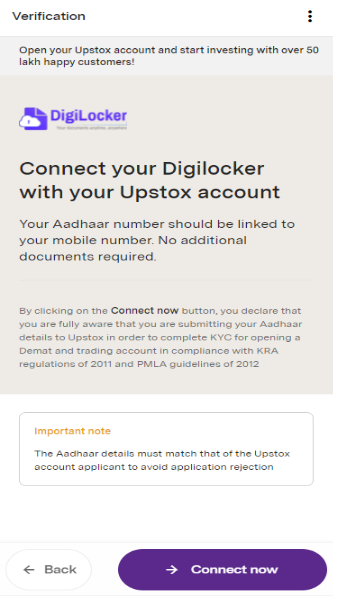
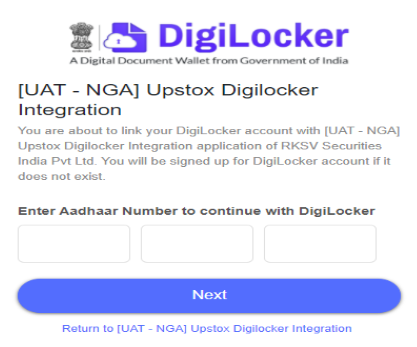
Step 2: Enter Aadhaar number
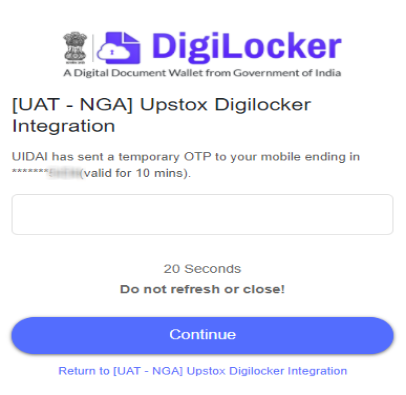
Step 3: Enter OTP received on Aadhaar linked mobile number
Step 4: Click Allow to give permission
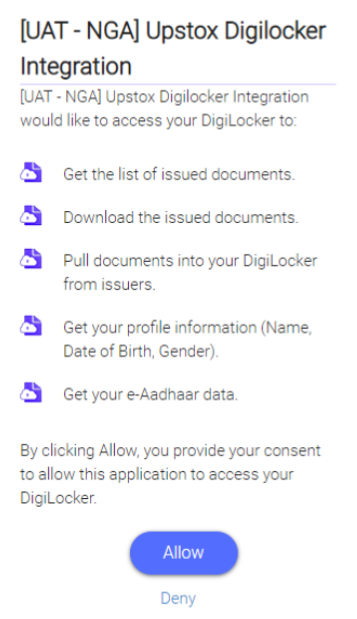
Your Aadhaar card and PAN card (if available) will be fetched automatically once you link your DigiLocker account to Upstox’s DigiLocker wallet.
Related Articles:
Trade with Upstox
Want to open a Demat account?
Open a FREE Demat and Trading account to invest in Stocks, Mutual Funds, IPOs and more.
By signing up you agree to receive transaction updates on Whatsapp. You may also receive a call from an Upstox representative to help you with the account opening process.
Upstox Community
Upstox Community
| Topic | Replies | Views | Activity |
|---|