
Help Center

Getting Started
Trading
My Account
Mutual Funds
IPOs
Stock SIP
Gold
NPS
Government Securities
Fixed Deposits
Insurance
Loan
Smallcase
DartStock
Upstox API
NCD
US Stocks
How to refer someone to Upstox?
You can refer your friends from the ‘Rewards and Referrals’ page on the Upstox app.
Step 1: Login to the Upstox app using your 6-digit PIN or biometrics.
Step 2: Click on ‘Upstox Icon’ at the top left corner of the screen.
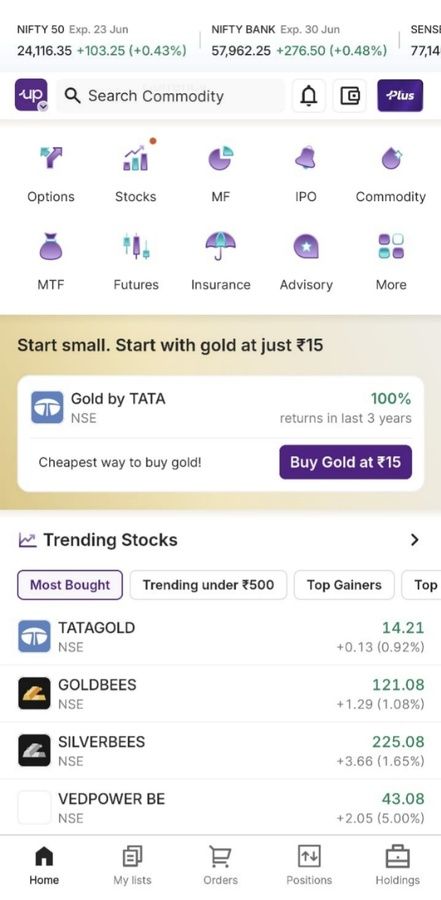
Step 3: Click on 'Refer and Earn'.
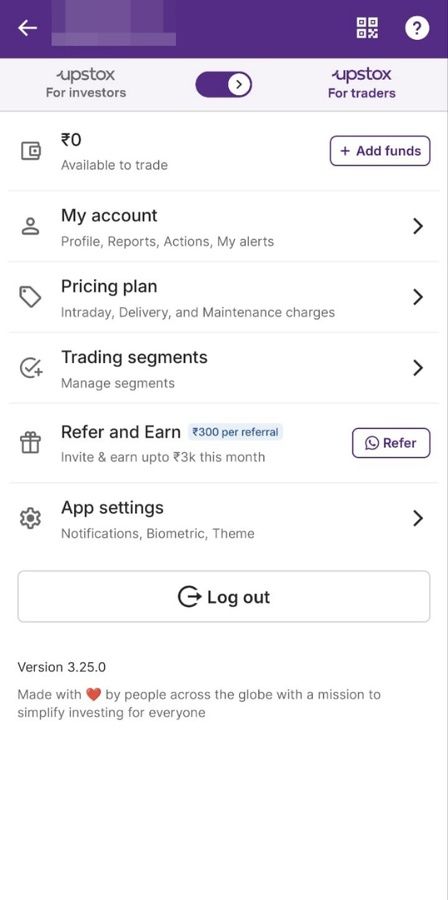
Step 4: You have multiple options to invite a user:
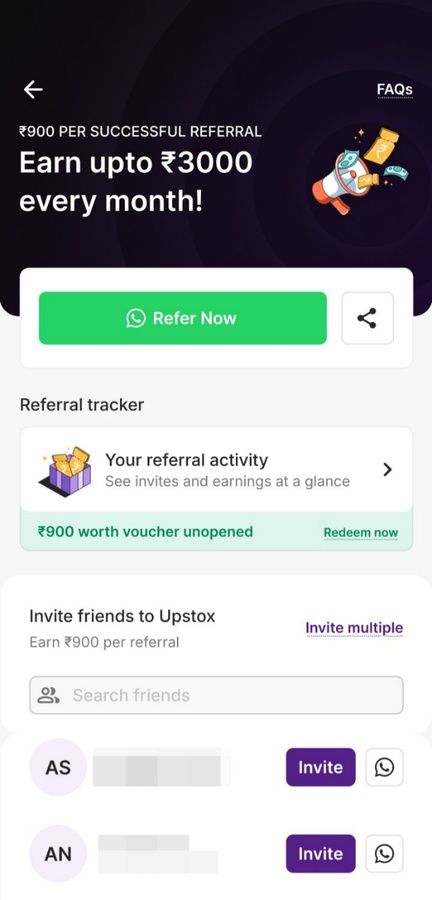
Click on the Share icon.
Select any app of your choice to share your referral link.
You can also copy the referral link and share it with anyone directly.
Alternatively, you can give permission to Upstox to sync your contacts. Once done you can:
Click on “Invite” against each contact to send them an invite on WhatsApp from Upstox’s account.
Click on the WhatsApp icon against each contact. You will be redirected to their WhatsApp chat with the referral message and link already written. Hit send.
Important Notes:
1. Referral Reward Visibility:
- The amount shown in the main rewards screen is the total amount that you can earn via refer and earn in the current calendar month.
2. Referral Link Usage:
- After your referred friend receives the referral link, they need to:
Click on the link.
Follow the sign-up process.
Complete the account-opening process with Upstox.
Key Points to Remember:
User must use your referral link only to download the Upstox app.
1. Referral Link Validity:
- Once the user has verified their mobile number on the Upstox app, they must complete the account opening process within 7 days.
2. Expired Links:
- If your friend does not complete the account-opening process within 7 days from mobile+OTP verification, they will no longer be mapped to your referral.
3. Active Offer Rewards:
- Your referral reward will be based on the offer active at the time your friend successfully completes their mobile number and email verification via OTP during the Upstox sign-up process.
4. Monthly Referral Limit:
- Referral rewards are valid only for the first 10 successful referrals per month. After that, no further rewards will be granted for additional referrals made during the same month. A successful referral means that the referred person has successfully opened an Upstox account.
5. Reward Eligibility Criteria to receive your referral reward:
- Successfully opens their Upstox account within 7 days of signing up (i.e., verifying mobile number and email via OTP). Should not have installed the app using a paid touch point 30 days before mobile and OTP verification. Should not have been a lead in the past or registered with Upstox in any capacity. The referral reward will be processed only after the referred friend’s Demat account is activated, following all document verification as per SEBI and internal guidelines.
Related Articles:
Trade with Upstox
Want to open a Demat account?
Open a FREE Demat and Trading account to invest in Stocks, Mutual Funds, IPOs and more.
By signing up you agree to receive transaction updates on Whatsapp. You may also receive a call from an Upstox representative to help you with the account opening process.
Upstox Community
Upstox Community
| Topic | Replies | Views | Activity |
|---|