
Help Center

Getting Started
Trading
My Account
Mutual Funds
IPOs
Stock SIP
Gold
NPS
Government Securities
Fixed Deposits
Insurance
Loan
Smallcase
DartStock
Upstox API
NCD
US Stocks
Minor Account
How do I execute a basket?
Once your basket is ready with all the orders, executing it is quick and simple.
How to execute basket:
Step 1: Review all orders in your basket -Double-check prices, quantities and order types
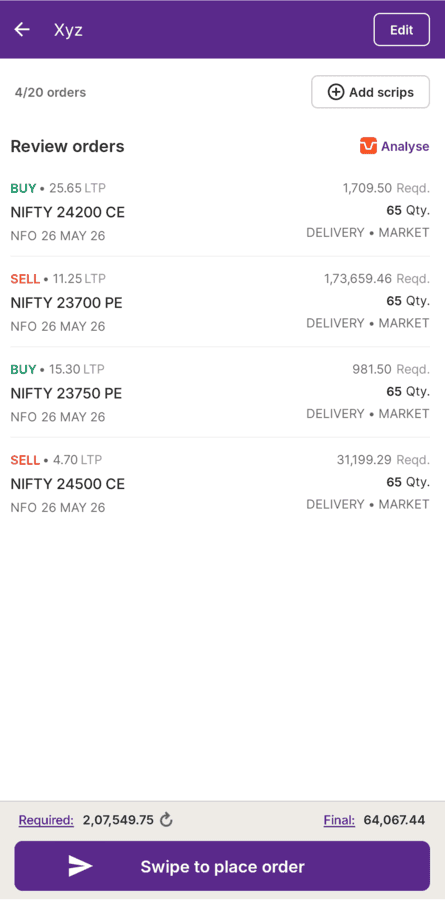
Step 2: At the bottom of the screen, you will see 'Swipe to place order'
Step 3: Swipe to execute all orders at once.
Step 4: All orders get sent to the Exchange immediately.
Done! Your basket is now live.
Important notes:
Order sequence - Orders execute in the same order they appear in your basket. If sequence matters for your strategy, arrange them properly before executing.
Market execution - Each order executes based on
- Current market conditions
- Your specified price (for limit orders)
- Available quantity
- Order type (market, limit, etc.)
Tracking your orders: You can monitor everything right in the basket
- Order status updates automatically
- Use the 'Refresh' button for manual updates
- See which orders are executed, pending, or rejected
Also,
- Always review before swiping
- Check your available funds/margins
- Keep an eye on market conditions
- Use the refresh button if status doesn't update
Your basket executes fast, so make sure everything is correct before you swipe!
Trade with Upstox
Want to open a Demat account?
Open a FREE Demat and Trading account to invest in Stocks, Mutual Funds, IPOs and more.
By signing up you agree to receive transaction updates on Whatsapp. You may also receive a call from an Upstox representative to help you with the account opening process.
Upstox Community
Upstox Community
| Topic | Replies | Views | Activity |
|---|