
Help Center

Getting Started
Trading
My Account
Mutual Funds
IPOs
Stock SIP
Gold
NPS
Government Securities
Fixed Deposits
Insurance
Loan
Smallcase
DartStock
Upstox API
NCD
US Stocks
How can I check my Mutual Funds portfolio?
To check your MF order history, log in to our Upstox app (investors mode).
Steps to access the MF portfolio via Upstox - For investors
Step 1: Click on Mutual Funds > Portfolio > Your portfolio > Investments
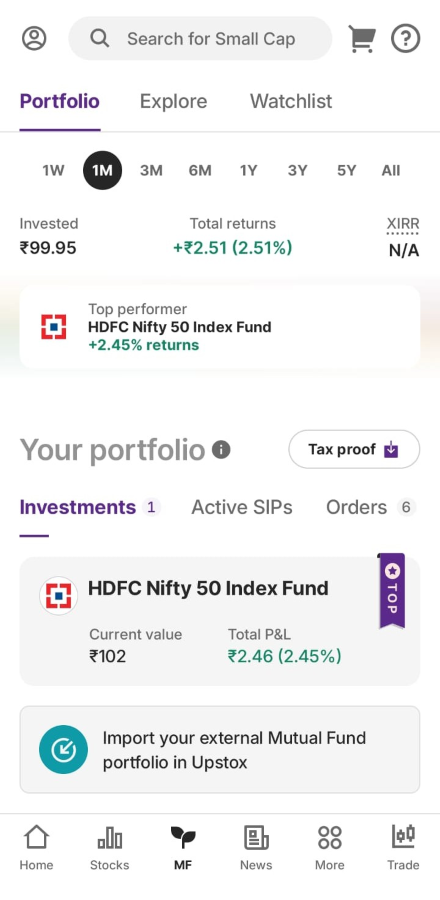
Step 2: Once you click on ‘Investments’ you will be able to see the funds you are invested in.
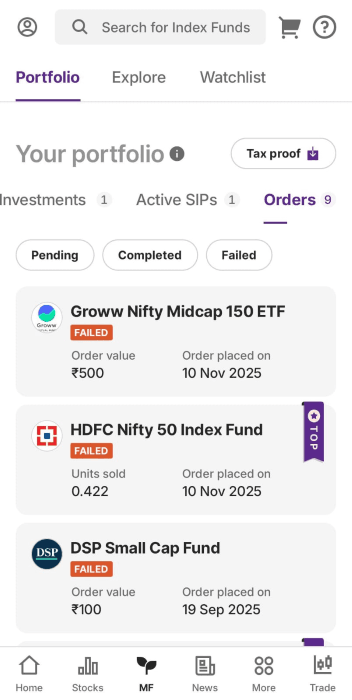
Step 3: Click on ‘Orders’ > 'View all' which will show you order status as Pending, Completed and Failed.
If you're using Trader mode:
- Log in to the Upstox app.
- Go to Holdings.
- Select Mutual Funds.
- Tap Investments to view your Mutual Fund portfolio.
Related Article:
Trade with Upstox
Want to open a Demat account?
Open a FREE Demat and Trading account to invest in Stocks, Mutual Funds, IPOs and more.
+91
By signing up you agree to receive transaction updates on Whatsapp. You may also receive a call from an Upstox representative to help you with the account opening process.
Upstox Community
Upstox Community
| Topic | Replies | Views | Activity |
|---|