
Help Center

Getting Started
Trading
My Account
Mutual Funds
IPOs
Stock SIP
Gold
NPS
Government Securities
Fixed Deposits
Insurance
Loan
Smallcase
DartStock
Upstox API
NCD
US Stocks
Minor Account
What are the steps to pre-define your order preferences?
Chart 360 has made it easier for traders to pre-set their order choice in order to streamline trading and minimise manual repetitive filling in.
This feature provides more personalised options for how the trade is initiated faster in a consistent manner based on how the user trades.
Preference 1:
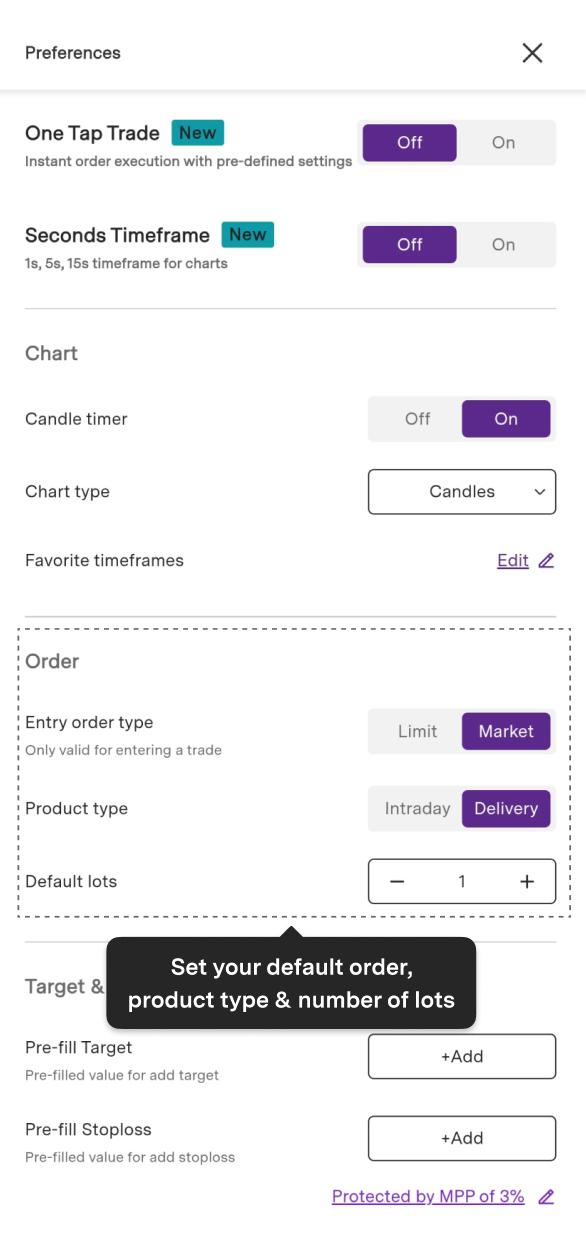
Entry Order Type: A user can now pre-set a default order type to submit as either a Market or Limit order type. This values for traders in that each time an order is entered the market order type is configured to the user preference without continual modifying.
It should be noted that this default order type preference may only be used for entering a trade and cannot be used for exiting the trade.
Preference 2:
Product Type: Traders will be able to select their default product type as either Intraday or Delivery. This simplifies the trading process in regards to short-term or long-term strategy.
Preference 3:
Lot Size: In Chart 360, users can also pre-define the lot size for their orders based / trading volume and risk appetite. This means that the trader will save time in placing a trade while making sure that they are consistently sizing trades.
Preference 4:
Adding Target and Stop loss: To further streamline the trading process in Chart 360, users only need to click ‘+ADD’ to pre-define a Target (TG) and/or Stop-loss (SL) percentage for their orders.
If the target/stoploss is shown in the order ticket, the trader must manually enter the target/stoploss value when placing the order.
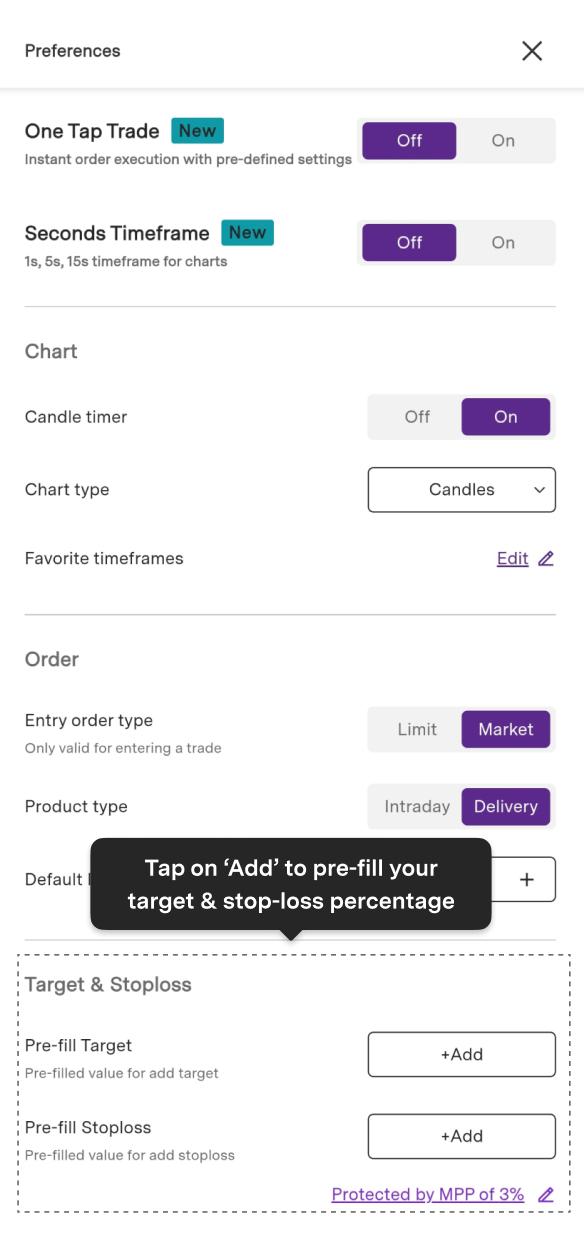
Note: For a prefilled TG/SL, you must explicitly add TG/SL while placing the order.
Trade with Upstox
Want to open a Demat account?
Open a FREE Demat and Trading account to invest in Stocks, Mutual Funds, IPOs and more.
By signing up you agree to receive transaction updates on Whatsapp. You may also receive a call from an Upstox representative to help you with the account opening process.
Upstox Community
Upstox Community
| Topic | Replies | Views | Activity |
|---|