Integrate Upstox Trading Data with AI Assistants via MCP
The Upstox Model Context Protocol (MCP) integration enables AI assistants like Claude, Claude Code, ChatGPT, Cursor, and VS Code to access your trading account data directly. This transforms generic AI tools into personalized financial advisors that understand your specific portfolio, positions, and market context.
What is Model Context Protocol (MCP)?
Model Context Protocol (MCP) enables AI assistants to access your account-specific trading data in real-time, creating context-aware conversations about your actual investments. Instead of generic market advice, you get insights based on your holdings, positions, and account status.
MCP provides these capabilities:
- Account-scoped insights: Analysis of your actual portfolio composition, performance, and risk exposure
- Real-time market context: Current prices, volumes, and market movements integrated into your conversations
- Conversational API access: Natural language queries that map to precise API calls and data retrieval
- Personalized research: Stock analysis that considers how potential investments fit with your existing holdings
The fundamental advantage: traditional AI assistants work with publicly available information only. MCP-enabled assistants understand your specific financial situation, making their guidance relevant to your actual investment decisions.
Compatible AI platforms include Claude Desktop (and the Claude web app), Claude Code, ChatGPT (with Developer mode), Cursor, and VS Code with GitHub Copilot, giving you flexibility in choosing your preferred development or analysis environment.
Supported Account Data
The Upstox MCP currently supports read-only access to the following account data, which your AI assistant uses to answer questions and generate insights about your account:
- Holdings
- Orders
- Positions
- Mutual funds
- Funds
- Profile
Setup Overview
Connect your Upstox account to AI assistants in minutes:
- Select AI client: Use the tabs below to choose Claude Desktop, Claude Code, ChatGPT, Cursor, or VS Code with GitHub Copilot
- Install dependencies: Download from nodejs.org (not needed for Claude Desktop or Claude Code, which install via the plugin marketplace)
- Add MCP configuration: Insert Upstox server details in your AI client settings
- Authorize account: Complete OAuth flow to securely link your trading account
- Begin analysis: Start asking questions about your portfolio and market data
Select your client in the tabs below to see setup steps.
Prerequisites
Before setting up MCP integration, ensure you have:
- An active Upstox trading account (non-dormant status) - Learn about Upstox API authentication
- Node.js installed on your computer (not required for the Claude Desktop or Claude Code plugin methods)
- One of the supported AI clients:
- Claude Desktop application (or the Claude web app) — install via the plugin marketplace
- Claude Code
- ChatGPT (with Developer mode enabled)
- Cursor IDE
- VS Code with GitHub Copilot extension
- Familiarity with Upstox API basics and developer documentation
Setting up Upstox MCP
- Claude Desktop
- Claude Code
- ChatGPT
- Cursor
- VS Code with GitHub Copilot
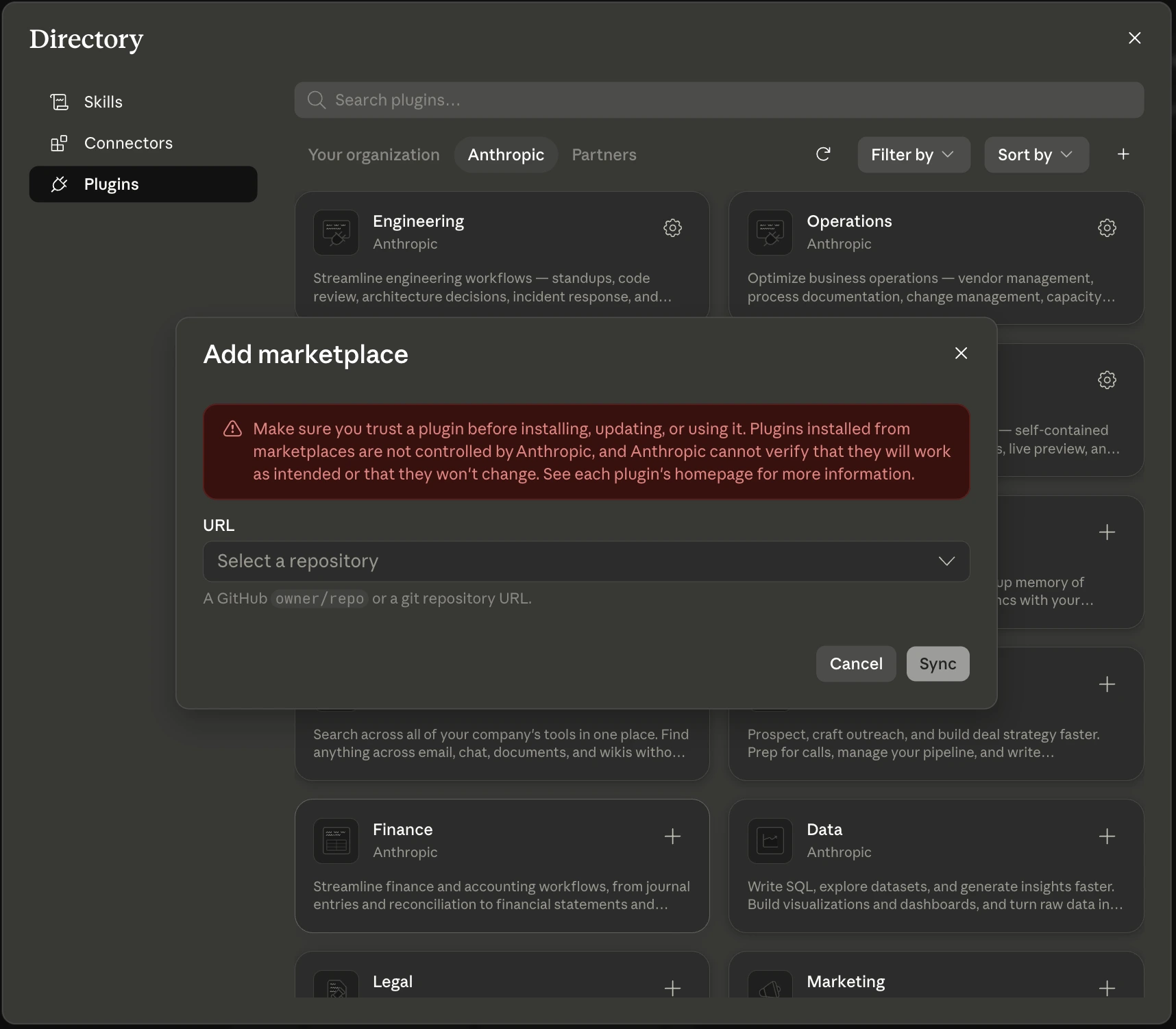
Claude Desktop / web app — Add marketplace
Install the Upstox MCP through the Claude app's plugin marketplace — no config file or Node.js needed. The MCP server installs as a connector.
-
Open Settings → Plugins (or Customize → Plugins).
-
Under Personal plugins, click +, then Add marketplace.
-
In the URL field, enter the repository:
upstox/upstox-plugin-marketplace -
Click Sync, then install the
upstox-mcpplugin. -
Open the installed plugin and go to its Connectors tab. Click Install (or Connect) next to the
upstoxconnector. -
Claude opens your browser for the Upstox OAuth consent. Approve access to link your account. Re-authorize once per day.
The same marketplace also offers upstox-skill — an agent skill that can place and manage orders. Use upstox-mcp to analyze and ask questions (read-only); use upstox-skill to build and run trading workflows.
Note that upstox-skill is a Claude Code (and Codex) agent skill, not a chat connector. It runs inside a coding agent and uses the official upstox-python-sdk to execute trades and stream data, so it needs a Python environment with that SDK installed — it won't run in plain Claude Desktop chat. See the Agent Skills guide for setup.
The Upstox MCP is a custom connector. On Team and Enterprise plans the Install / Connect button is disabled until an organization Owner enables connectors and allows custom connectors (Organization settings → Connectors), and your role has connector permission. On individual Pro/Max accounts you can connect it yourself. See Get started with custom connectors using remote MCP.
Claude Code
In Claude Code, add the Upstox marketplace once, then install the MCP plugin — no Node.js or manual mcpServers editing required (Claude Code connects to the server over HTTP natively):
/plugin marketplace add upstox/upstox-plugin-marketplace
/plugin install upstox-mcp@upstox-plugins-official
Run /mcp to confirm the upstox server is listed. On first tool use, Claude Code opens your browser for the Upstox OAuth consent; re-authorize once per day.
/plugin marketplace add takes the repository name (upstox-plugin-marketplace), while /plugin install takes the marketplace name (@upstox-plugins-official).
ChatGPT
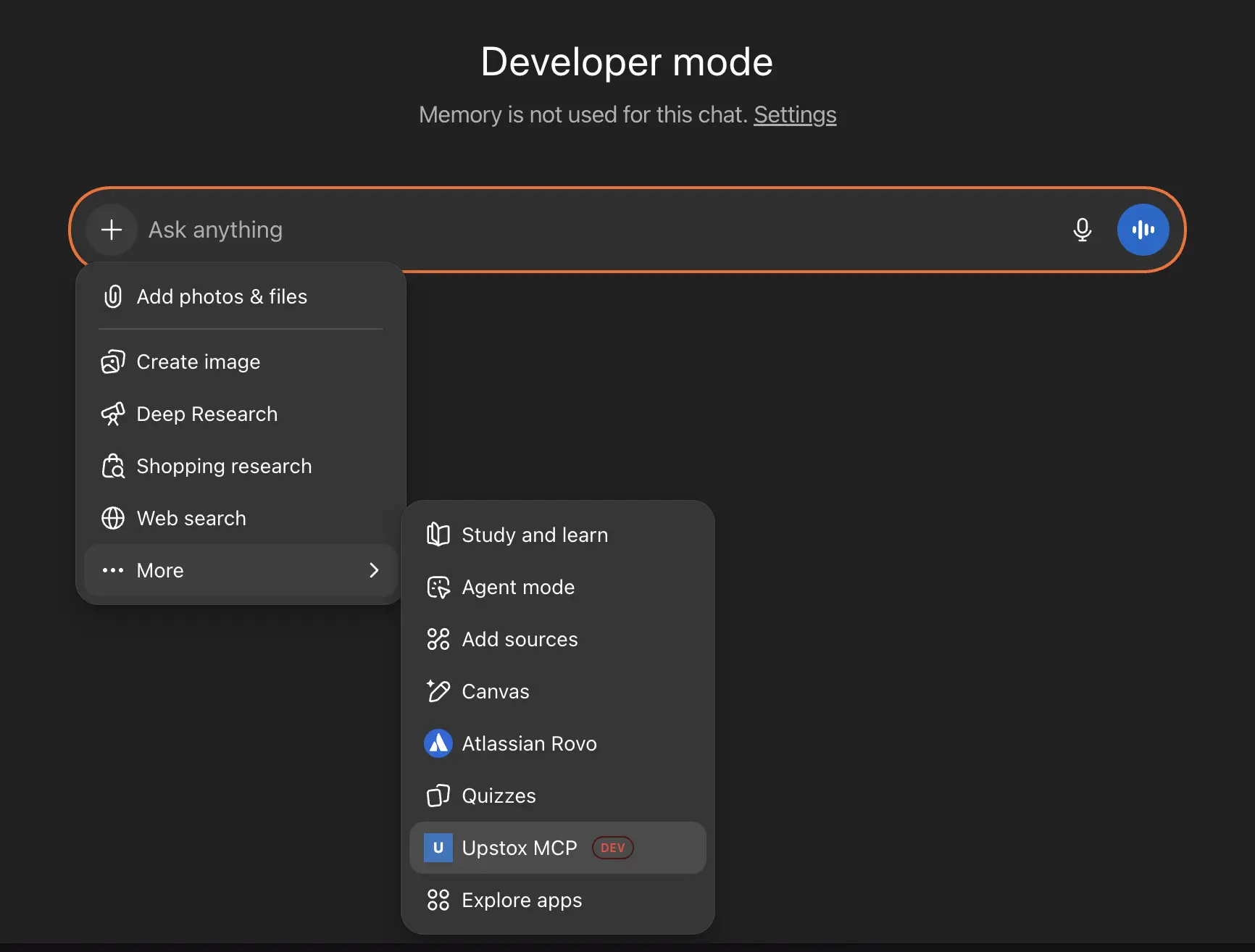
ChatGPT supports MCP through custom apps and Developer mode. For the full setup process, see the official guide: Developer mode and MCP apps in ChatGPT (beta) on the OpenAI Help Center.
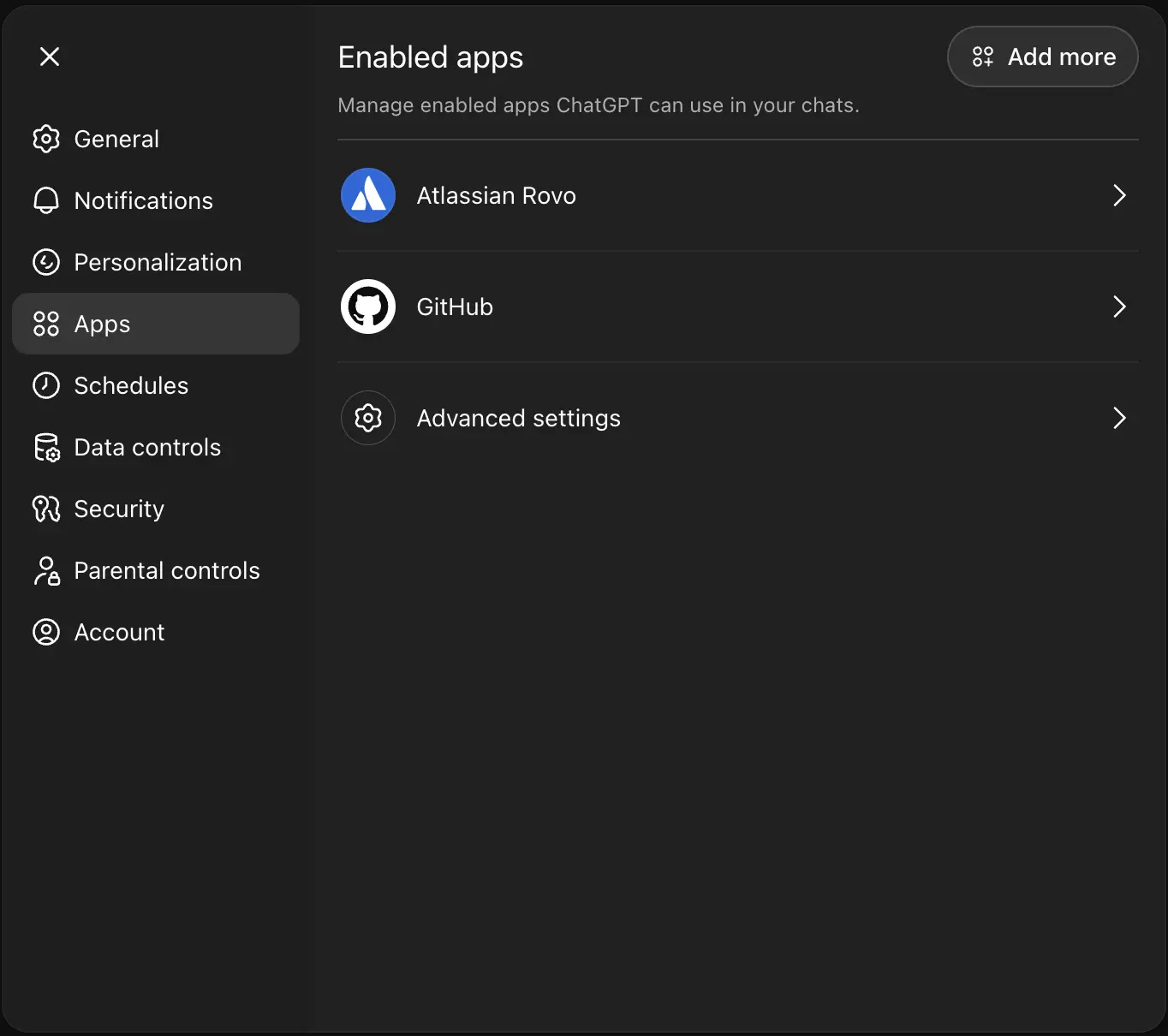
Open the Apps section
- Open Settings (or Workspace Settings for teams), then go to the Apps section.
Enable Developer mode
- In Apps, open Advanced settings and enable Developer mode.
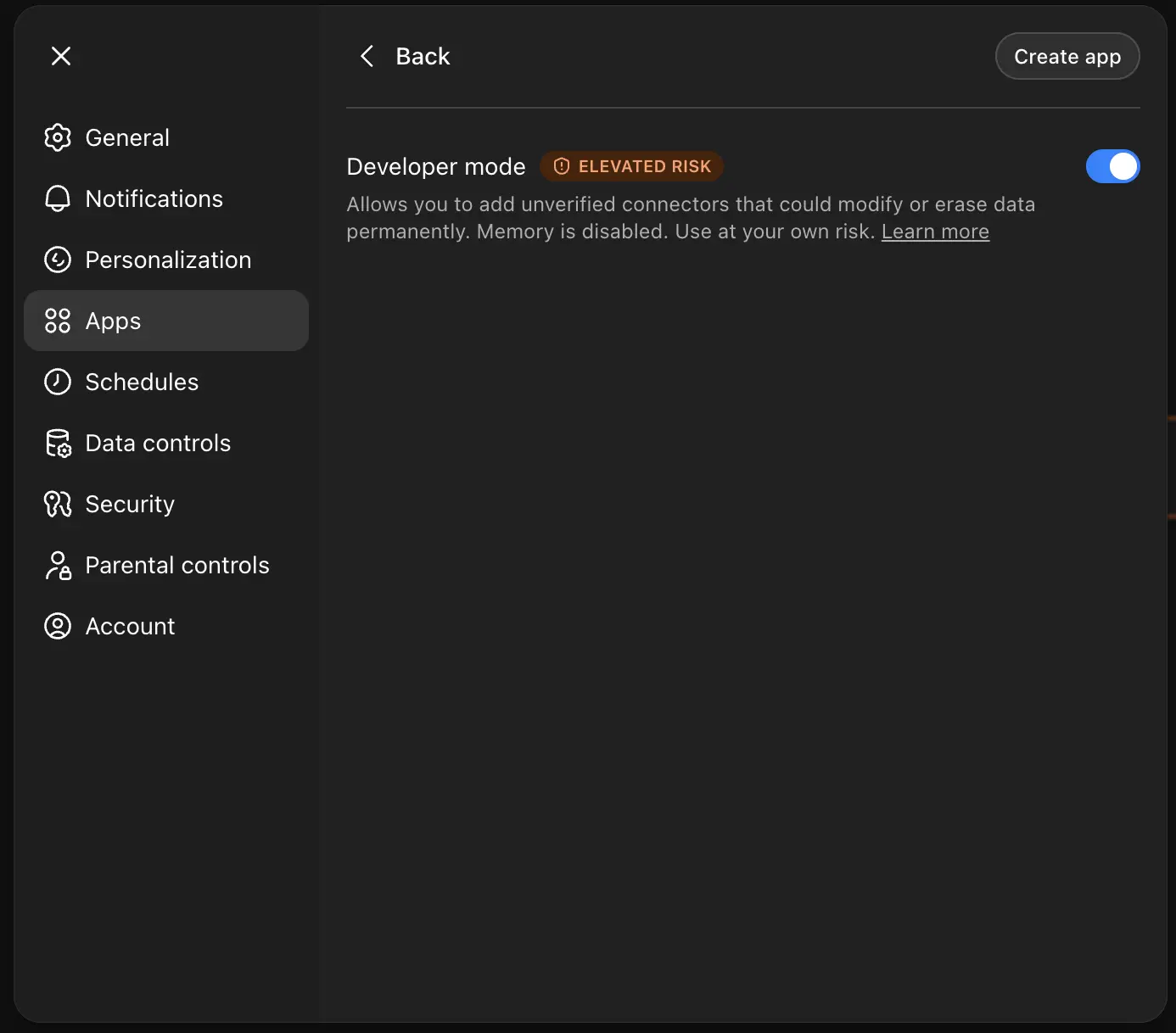
Create app with Upstox MCP
- Click Create app and fill the form with the Upstox MCP server details. Use endpoint:
https://mcp.upstox.com/mcp.
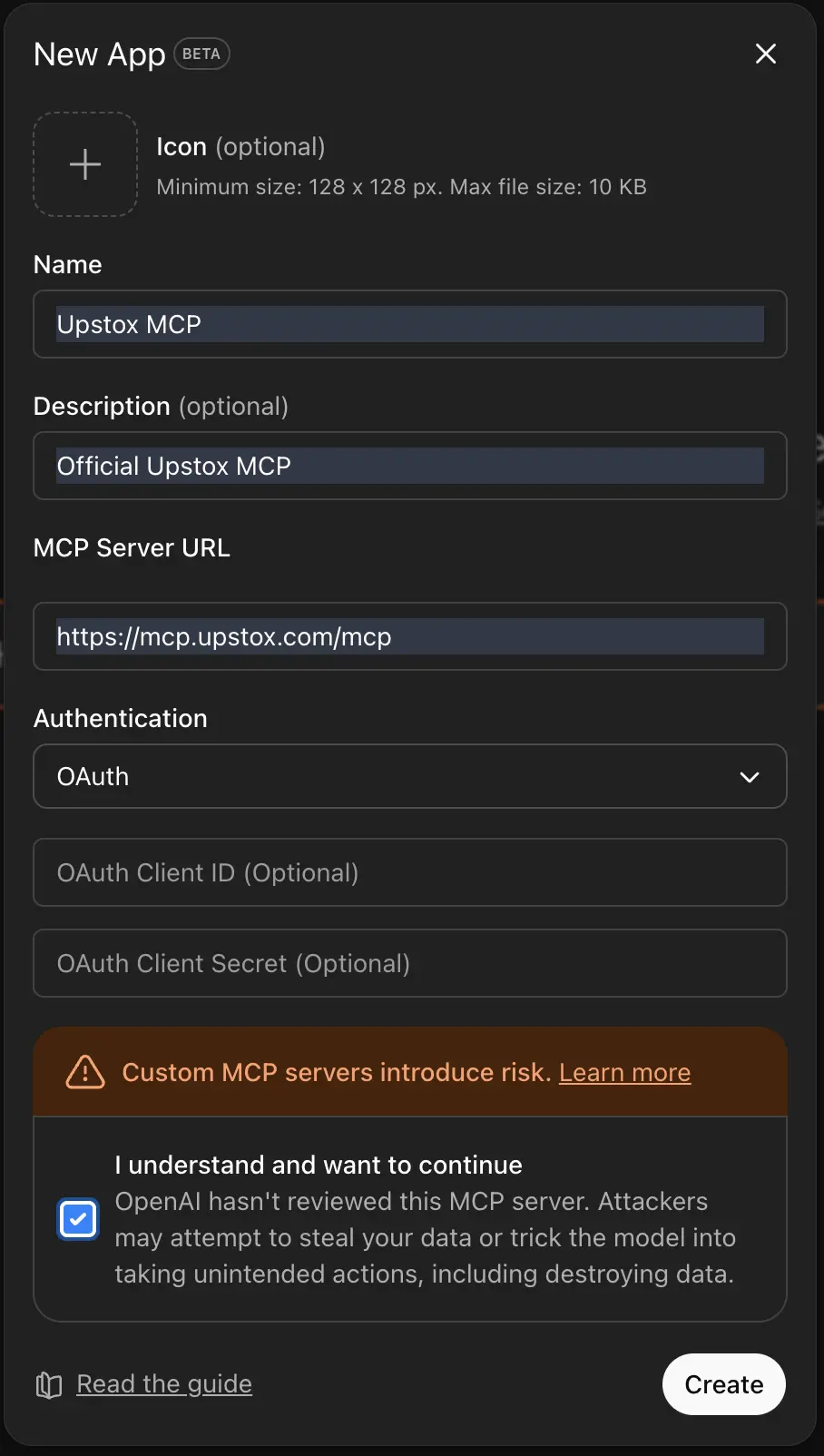
Use Upstox in chat
- Once the MCP connection succeeds and the confirmation pop-up appears, go to Chat and select Upstox MCP from Connectors.
Cursor
Cursor supports MCP through Settings. For an overview of MCP in Cursor, see the Official Cursor documentation: Model Context Protocol.
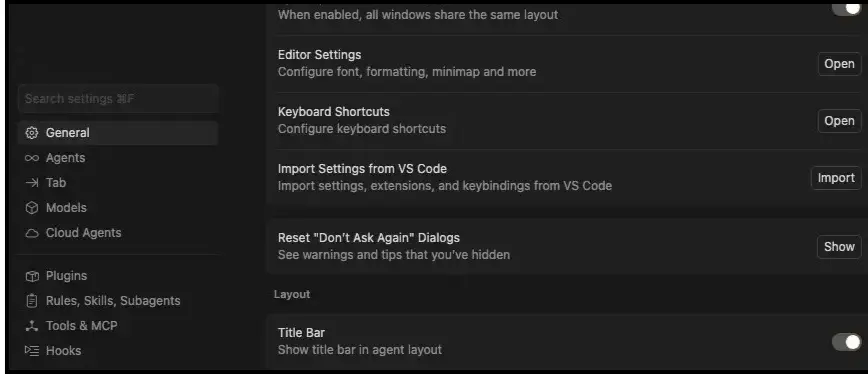
Go to Settings, Tools and MCP section
- Open Settings, then go to the Tools and MCP section.
Add custom MCP
- Click Add custom MCP if no MCP is present, or click the plus (+) icon if an MCP connection already exists.

Add the configuration
- A config file will open. Add the following configuration:
{
  "mcpServers": {
    "Upstox MCP": {
      "command": "npx",
      "args": ["mcp-remote", "https://mcp.upstox.com/mcp"]
    }
  }
}
Connect and verify
- Go back to Settings and connect the Upstox MCP. You will then see the list of available tools.

VS Code with GitHub Copilot
Prerequisites
- Visual Studio Code installed
- Node.js installed
- VS Code GitHub Copilot extension
Configuration Steps
- Open VS Code settings (File > Preferences > Settings, or press
Ctrl+,) - Search for "copilot chat mcp" or navigate to the GitHub Copilot Chat configuration
- Click on Edit in settings.json
- Add the following configuration to your settings.json file:
{
    "mcp": {
        "inputs": [],
        "servers": {
            "Upstox MCP": {
                "url": "https://mcp.upstox.com/mcp"
            }
        }
    }
}
- Save the settings file and restart VS Code
- Open the Copilot Chat panel and use the
/mcpcommand to verify that Upstox is listed as an available MCP server - When prompted, authorize your Upstox account to connect with VS Code
If you are a developer, you can also run the Upstox MCP server on your local machine for development and testing. Follow the setup steps in the mcp-server-upstox-api README.
Capabilities with Upstox MCP
Once connected, your AI assistant can provide natural language analysis of your trading account and market data.
Portfolio Insights
- Position breakdown: Detailed view of current holdings with performance metrics
- Profit/loss tracking: P&L analysis across custom time periods
- Diversification analysis: Sector and asset allocation assessment
- Benchmark comparison: Performance relative to market indices
Account Data
- Available margins: Real-time buying power and margin utilization - See margin APIs
- Profile information: Account status and configuration details - User profile APIs
- Activity summaries: Daily trading and P&L overviews
Market Research
- Individual stock analysis: Research securities in context of your existing portfolio
- Technical indicators: Chart analysis and trend identification
Example Use Cases
Here are some examples of how you can interact with your AI assistant using Upstox MCP:
Stock Analysis and Hold/Sell Decision
Ask your AI: "Check the stocks based on their current trends, valuations, Technicals etc and tell me if I should continue holding it or not"
Corporate Governance Analysis
Ask your AI: "Go through the latest board meetings and AGM/EGMs of the stocks in my company and derive the health of my portfolio"
Professional Investment Model Analysis
Ask your AI: "Run investment models of Goldman Sacch and other top PMSs on my Portfolio and give me a deep down of the analysis"
Portfolio Correlation Analysis
Ask your AI: "Find the correlation (beta) of my portfolio to the NIFTY index over the last 3 years. Show it to me on a chart with Week on week and QoQ timeframes"
Responsible Usage Guidelines
- Multiple Sources: Use AI insights as one of many research tools in your investment process
- Verify Data: Cross-check important information directly with the Upstox platform
- Independent Research: Conduct your own fundamental and technical analysis
- Professional Advice: Consult with qualified financial advisors for major investment decisions
- Risk Management: Maintain proper risk management regardless of AI recommendations
- Stay Informed: Keep up with market news and developments beyond AI analysis
Authentication and Security
Initial Authorization
First-time setup requires OAuth authorization to securely link your Upstox account. This ensures your trading data access is controlled and authenticated.
Daily Reconnection Policy
For security, you must re-authorize your account connection daily. This prevents unauthorized access and ensures data freshness.
Current Limitations
Read-Only Access: The MCP integration provides read-only access to your account data. You cannot place orders, modify positions, or execute trades through the AI assistant.
Daily Re-authorization: Account connections expire daily and require re-authentication for security.
Feature Scope: Supports portfolio analysis, account data, and market research.
Troubleshooting
Connection Issues
If you're having trouble connecting:
- Verify Node.js is properly installed (
node --version) - Check that your Upstox account is active and not dormant
- Ensure you're using the correct MCP server URL:
https://mcp.upstox.com/mcp - Restart your AI client after configuration changes
Authentication Problems
If authorization fails:
- Check your internet connection
- Verify your Upstox login credentials work on the main platform
- Try disconnecting and reconnecting your account
- Clear browser cache if using web-based authentication
AI Response Issues
If AI responses seem incorrect or incomplete:
- Remember that AI can make mistakes - always verify important information
- Try rephrasing your question more specifically
- Cross-check data directly with your Upstox account
- Consider asking for clarification or additional details
Daily Reconnection
If you're prompted to reconnect:
- This is normal security behavior - reconnect once per day
- Use the same authorization process as initial setup
- Your AI assistant will regain access to your current data
Support and Community
For technical support with MCP integration or general API questions, visit the Upstox Developer Community.
For account-specific issues, contact Upstox customer support through your trading platform.
Related Documentation:
- Upstox API Overview - Complete API documentation
- Authentication Guide - Learn about OAuth and API keys
- WebSocket Implementation - Real-time market data streaming
- Example Code - Sample implementations
- SDK Documentation - Official software development kits
Frequently Asked Questions (FAQ)
How to integrate Upstox API with Claude AI?
To integrate Upstox API with Claude, open the Claude Desktop or web app, go to Settings → Plugins → Add marketplace, add the upstox/upstox-plugin-marketplace repository, install the upstox-mcp plugin, and connect the upstox connector to authenticate your Upstox account through the secure OAuth flow. No config file or Node.js is required.
How do I add the Upstox MCP marketplace in the Claude app?
In the Claude Desktop or web app, open Settings → Plugins (or Customize → Plugins), under Personal plugins click + → Add marketplace, enter the repository upstox/upstox-plugin-marketplace, click Sync, then install the upstox-mcp plugin. This installs the Upstox MCP as a connector with no config file or Node.js — Claude runs the Upstox OAuth flow in your browser on first use. See the Claude Desktop (plugin) tab above.
How do I connect Upstox MCP in Claude Code?
In Claude Code, run /plugin marketplace add upstox/upstox-plugin-marketplace followed by /plugin install upstox-mcp@upstox-plugins-official. No Node.js is needed because Claude Code connects to the hosted server (https://mcp.upstox.com/mcp) over HTTP directly. Run /mcp to verify the upstox server is listed, then authorize your Upstox account on first use. Note that add uses the repository name (upstox-plugin-marketplace) while install uses the marketplace name (@upstox-plugins-official).
The Install / Connect button for the Upstox connector is greyed out — why?
The Upstox MCP is a custom connector, and on Team and Enterprise Claude plans custom connectors are gated by organization policy. The button stays disabled until an organization Owner enables connectors and allows custom connectors under Organization settings → Connectors, and your assigned role has connector permission. On individual Pro/Max accounts you can add and connect it yourself. See Get started with custom connectors using remote MCP.
How do I connect Upstox MCP to ChatGPT?
Enable Developer mode in ChatGPT (Settings → Apps → Advanced settings), then create a custom app with the Upstox MCP endpoint (https://mcp.upstox.com/mcp). After the connection is confirmed, select Upstox MCP from Connectors in Chat. See the ChatGPT tab above and the official OpenAI guide for step-by-step instructions.
How do I connect Upstox MCP to Cursor?
Open Cursor Settings → Tools and MCP, click Add custom MCP (or the plus icon if you already have an MCP), add the Upstox MCP config (see the Cursor tab above), then go back to Settings and connect the Upstox MCP. For more on MCP in Cursor, see the official Cursor MCP documentation.
Can I use Upstox MCP with VS Code?
Yes, Upstox MCP works with VS Code through the GitHub Copilot extension. Add the MCP server configuration to your VS Code settings.json and use the /mcp command to access Upstox trading data.
Is Upstox MCP integration free?
Yes, connecting your Upstox account to AI assistants via MCP is completely free. You only need an active Upstox trading account and one of the supported AI clients.
What Upstox API data can I access through MCP?
Through Upstox MCP, you can access portfolio holdings, positions, profit & loss data, account margins, market quotes, and historical trading information in real-time.
How often do I need to reconnect Upstox MCP?
For security purposes, you need to reconnect your Upstox account once per day. This ensures your trading data remains secure and prevents unauthorized access.
Can I place trades through Upstox MCP?
No, Upstox MCP provides read-only access to your account data. You cannot place orders, modify positions, or execute trades through the AI assistant for security reasons.
What should I do if Upstox MCP authentication fails?
If authentication fails, check your internet connection, verify your Upstox credentials work on the main platform, try disconnecting and reconnecting.
How does Upstox MCP compare to other trading API integrations?
Upstox MCP offers seamless natural language interaction with your trading data, real-time portfolio analysis, and integration with popular AI assistants, making it more accessible than traditional API implementations.
What are the system requirements for Upstox MCP?
You need Node.js installed on your computer, an active Upstox trading account (non-dormant), and one of: Claude Desktop, ChatGPT (with Developer mode), Cursor, or VS Code with GitHub Copilot extension.
What if I have multiple Node.js or npx versions installed (for example via nvm)?
If you have multiple versions of node and npx installed (for example via nvm), your AI client might pick the wrong binary when starting the MCP server. This can lead to startup errors similar to those described in this GitHub issue.
In this case, configure your MCP server by pointing directly to the full paths of node and npx instead of relying on the default npx on your PATH. For example:
{
  "mcpServers": {
    "mcp-server-upstox-api": {
      "command": "/Users/name/.nvm/versions/node/v20.19.4/bin/node",
      "args": [
        "/Users/name/.nvm/versions/node/v20.19.4/bin/npx",
        "mcp-remote",
        "https://mcp.upstox.com/mcp"
      ]
    }
  }
}
Adjust the paths and URL to match your local Node.js installation and MCP endpoint.
Important Disclaimers
AI-generated analysis serves as research support, not investment advice. Always:
- Verify information independently and conduct your own due diligence
- Cross-check AI outputs with multiple sources and professional analysis
- Consult qualified financial advisors for major investment decisions
- Recognize that AI responses may contain errors or incomplete information
- Treat AI insights as research starting points, not final guidance
Although MCP provides real-time account access, confirm critical information directly through the Upstox platform before taking action.
Usage Terms: This integration offers data access for analytical purposes only. Investment outcomes remain your responsibility. Neither Upstox nor AI platforms bear liability for decisions based on AI-generated insights.